
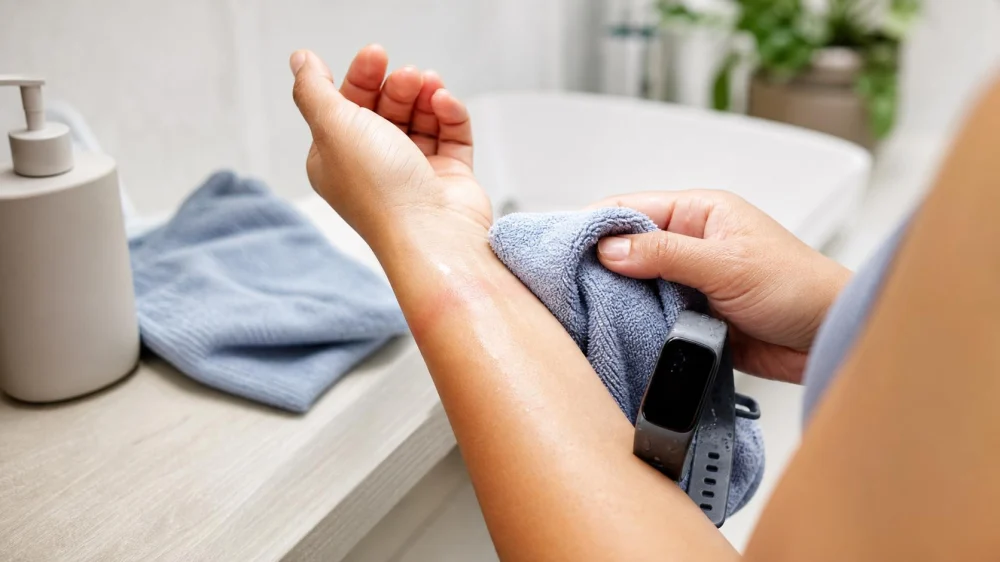
Skin Care Under Smartwatches and Fitness Trackers
On this page
Quick answer
If skin under a smartwatch or fitness tracker becomes red, itchy, bumpy, or sore, remove the device and let the area recover. Clean and fully dry both skin and the wearable according to its instructions, check that the band is not tight, and avoid putting the device back over a rash. Recurring irritation can come from friction, trapped sweat, soap residue, or contact allergy and should be assessed by a dermatologist.
Wearable-device skin irritation is a reaction in the area where a watch body, sensor, buckle, or band contacts skin. It is a pattern, not a diagnosis. Irritant contact dermatitis, allergic contact dermatitis, friction, heat, sweat, acne-like bumps, and infection can look similar at first.
Why irritation can develop
A wearable creates an occluded contact zone: air movement is reduced while sweat, water, soap, sunscreen, and skin products can remain underneath. Movement adds repeated friction, especially when a band is tight or slides during exercise.
Possible contributors include:
- a band fitted tighter than the device maker recommends;
- sweat and heat trapped during workouts or sleep;
- water left after showering, swimming, or handwashing;
- soap, sanitizer, sunscreen, lotion, or cleaner residue;
- a rough band edge, damaged clasp, or grit under the sensor;
- fragrance, preservative, adhesive, dye, rubber additive, or metal allergy;
- continuous wear without breaks or cleaning;
- a pre-existing condition such as eczema or acne.
The rash location offers clues. A narrow mark at an edge suggests pressure or friction. A reaction beneath a metal buckle or watch back can raise concern about contact allergy. Small bumps in a sweaty occluded zone may reflect follicle irritation. These clues are not a substitute for diagnosis.
Check the fit and placement
Use the wearable maker’s placement and fit instructions, especially when a sensor requires skin contact. The band should be secure enough to function without digging into skin, leaving persistent grooves, causing numbness, or restricting movement.
- Remove the device. Inspect both wrist and forearm in bright light.
- Check pressure marks. A temporary light imprint may fade, but persistent indentation, swelling, pain, or color change is not a reason to tighten further.
- Inspect hardware. Look for cracked plastic, rough edges, corrosion, residue, and a buckle or sensor that no longer sits flat.
- Review placement. Keep the device away from cuts, active rash, fresh tattoo, or inflamed skin.
- Allow breaks. Follow the maker’s advice and remove the device periodically, including for charging and skin cleaning.
Do not wear the tracker on the opposite wrist if that skin is also irritated or if the same material may trigger a reaction. Switching sides can help only after the first area recovers and the underlying cause has been addressed.
Clean and dry skin and device
Cleaning instructions vary by device, band, sensor, coating, and water-resistance rating. Follow the manufacturer’s current instructions rather than submerging a wearable because it handled water in the past.
For the skin:
- Use lukewarm water and a gentle fragrance-free cleanser when cleansing is needed.
- Rinse away soap completely.
- Pat dry rather than rubbing.
- Let the skin become fully dry and cool before wearing a device.
- Use a fragrance-free moisturizer if skin is dry, but let it absorb before device contact.
For the wearable:
- turn it off or remove it from the charger as instructed before cleaning;
- separate the band only when the maker’s directions permit;
- use only approved cleaning methods and products;
- remove residue from the band holes, buckle, sensor rim, and textured underside;
- dry every surface and connection before reassembly, charging, or wear;
- replace a band that remains rough, cracked, stretched, or difficult to clean.
Do not apply disinfectant, alcohol, bleach, essential oil, abrasive paste, or household cleaner unless the manufacturer specifically approves it for that component. Product damage can create rough surfaces and additional skin exposure.
Use a post-workout routine
Heat, sweat, and friction rise together during exercise. A repeatable routine reduces the time moisture and residue remain against skin.
- Remove the device after the session when it is safe to do so.
- Gently clean the skin and rinse away sweat, sunscreen, and soap.
- Clean the band using its approved method.
- Dry skin, band, sensor, buckle, and connection points completely.
- Inspect for redness, bumps, tenderness, or a sharp hardware edge.
- Leave the device off until the area is cool and dry.
For long events, loosen or remove the device during breaks only when that is safe and compatible with the activity. Do not adjust a wearable while cycling, driving, climbing, operating equipment, or crossing traffic.
Investigate material reactions
Contact dermatitis occurs when something touching the skin irritates it or triggers an allergic reaction. The American Academy of Dermatology notes that jewelry and watches can be sources and that nickel is a common allergen. A person can develop allergy after years of wearing an item without a problem.
Before buying a replacement band:
- save the exact device and band model and material list;
- note which component aligns with the rash—the buckle, band, sensor, or adhesive edge;
- photograph the rash and device contact pattern;
- record time to onset and time to improvement after removal;
- list soaps, sanitizers, lotions, sunscreen, and cleaning products used nearby;
- ask the manufacturer about material details rather than relying only on “hypoallergenic” marketing.
Do not coat the device with nail polish, tape, or an improvised barrier. Coatings can wear off, trap moisture, interfere with sensors, alter electrical or charging behavior, and introduce another allergen. A dermatologist may recommend patch testing when allergic contact dermatitis is suspected.
Try a simple skin reset
For mild irritation without urgent warning signs, stop wearing the device over the affected skin. Keep the area cool, clean, and dry; use a gentle fragrance-free routine; and avoid introducing several new products. Do not scratch, scrub, exfoliate, shave over, or tightly cover the rash.
A fragrance-free moisturizer may help simple dryness. Do not start antibiotic, antifungal, steroid, acne, or numbing medication based only on an online image or assumption. The wrong product can worsen a rash or delay diagnosis.
Track daily change. Improvement after removing the device supports a contact or friction role but does not identify the exact material. If the rash returns with reuse, stop again and arrange professional evaluation rather than repeating the challenge.
Warning signs and professional care
See a dermatologist when the rash recurs, blisters, oozes, becomes painful, spreads beyond the contact area, leaves thick or cracked skin, or does not improve after avoiding the device. Bring the wearable, band packaging, material information, product list, and photos.
Seek prompt medical care for increasing warmth, swelling, spreading redness, pus, yellow crust, red streaks, fever, significant tenderness, or a rapidly worsening wound. People with diabetes, poor circulation, immune suppression, or reduced sensation should ask a clinician about earlier assessment.
Call 911 in the United States for facial or throat swelling, trouble breathing, fainting, or another severe allergic reaction. Remove the device if it can be done safely, but do not delay emergency care.
Evidence and limitations
The distinction between irritation and allergic contact dermatitis and the need to identify and avoid the cause are based on the AAD’s contact dermatitis guidance. The possibility of nickel exposure from watches is discussed in the AAD’s nickel allergy guidance. The AAD also explains how heat, sweat, and friction under equipment can contribute to acne mechanica.
This article cannot diagnose a rash, certify a band material, or override a device’s cleaning, water-resistance, charging, or sensor instructions. Product composition can change, and skin response is individual. Consult the manufacturer for device care and a dermatologist for diagnosis and treatment.
Frequently asked questions
Is a red watch mark always an allergy?
No. Pressure, friction, heat, sweat, soap residue, and allergy can all cause redness. A rash that itches, recurs, blisters, or aligns with one material deserves dermatology assessment.
Can I keep wearing the tracker loosely over a rash?
Do not place it over active irritated or broken skin. Continued contact can prolong friction, moisture, or allergen exposure. Let the area recover and identify the cause before resuming wear.
Should I switch to the other wrist?
Only after the skin is healthy and the suspected cause has been addressed. Moving the same tight, dirty, or allergenic band can create a second rash.
How often should I clean a smartwatch band?
Use the device maker’s schedule and clean sooner after sweat, swimming, sunscreen, or visible soil. Skin and band should be fully dry before rewearing.
Will a fabric band prevent irritation?
No material prevents every reaction. Fabric may reduce or increase moisture retention depending on its design and care. Choose a manufacturer-compatible band with disclosed materials and keep it clean and dry.
Next steps
Remove the device, photograph the contact pattern, and clean and dry the wrist and wearable according to their separate instructions. Check fit, hardware, and recent product changes. If irritation returns after a careful reset—or if blisters, drainage, spreading redness, pain, or fever develops—stop wearing it and obtain medical evaluation.



 Perfect Place Aesthetics5.0 (60 reviews)
 Fusion Spa4.0 (34 reviews)
 Michele Terese Beauty5.0 (71 reviews)
 Arrow Esthetics5.0 (4 reviews)
 My Skin Esthetics5.0 (10 reviews)
 The Skin Angel Aesthetics5.0 (14 reviews)
 How to Treat and Prevent Skin Infections
 How To Heal Sun Damage And How To Manage It
 How to Repair Rosacea in People with Combination Skin
 How to Treat Skin Discoloration with the Best Brightening Products
 Daily Skin Care Routine for Age Spots – Simple Steps for Healthy, Glowing Skin
 Effective Ways to Treat and Prevent Skin Pigmentation from Hormonal Changes